

Use coach-focused drill libraries and printable practice-plan templates to run efficient, on-time practices. The best resources give you two things immediately: a clipboard-ready one-page PDF and a full practice plan with timed segments, coaching cues, and video links. Jr. NBA starter practice plans show exactly what that looks like, with downloadable one-pagers, full practice PDFs, embedded video demos, and a skills checklist coaches can use for player assessments.
Here’s what to grab right now:
- One-page practice plan PDF — print it, clip it, hand a copy to each assistant
- Full practice PDF — includes coaching cues, drill progressions, and video links
- Skills checklist — tracks player proficiency across ball handling, shooting, passing, and defense
- Reusable editable template — load it on your device, update weekly, export in under two minutes
Pro Tip: Structure every practice around four timed blocks: dynamic warmup, skill work, team concept, and live play, each lasting an appropriate portion of total practice time. A simple time block on your one-pager keeps every assistant on the same page.
Key Takeaways
Coach-focused drill libraries and printable practice-plan templates are the fastest way to run consistent, on-time practices and track real player development.
| Point | Details |
|---|---|
| Start with a one-pager | Download a clipboard-ready PDF and share it with every assistant before practice. |
| Tag drills by skill and difficulty | Weekly rotations build themselves when drills are tagged; assistants run consistent stations. |
| Use a four-step progression | Move players from Starter to Advanced across ball handling, shooting, defense, and more. |
| Schedule skills checkpoints | Run short weekly checks, monthly formal assessments, and in-practice spot checks tied to drill outcomes. |
| Hoop Mentality starter pack | The Basketball Starter Pack For Coaches delivers zero-setup one-pagers and full practice plans for immediate use. |
Table of Contents
- What do “coach-focused basketball drills apps” actually include?
- What features does every coach-focused drills app need?
- How do you build a weekly practice using a drill library and templates?
- How do skills checklists and progressions help you measure player development?
- How do you share plans with staff and communicate with players and parents?
- Should you buy a ready-made coach pack or build your own library?
- What coaches actually need from these resources
- Get clipboard-ready packs and editable templates from Hoop Mentality
- Sources
- FAQ
What do “coach-focused basketball drills apps” actually include?
Most search results for top basketball drills apps return player-facing tools: shot trackers, gamified skill feedback, and individual workout timers. This guide covers something different. Coach-focused drill libraries and practice-plan platforms are built for the sideline, not the player’s phone.
In scope for this guide:
- Drill libraries with tags for skill area, difficulty, and equipment
- Editable playbooks with printable diagrams and coaching cues
- Timed practice-plan templates (60, 75, and 90-minute formats)
- Printable one-pagers for clipboard use
- Staff-sharing features so assistants see the same plan
Out of scope: player-facing apps that track individual shot data, deliver gamified skill feedback, or provide consumer fitness programming. Those serve a different audience with a different job to do.
The output a coach should expect from any platform in this category: a one-page sideline plan, a full practice PDF with cues and video links, a skills checklist per player, and a shareable weekly calendar.
What features does every coach-focused drills app need?
Hoop Mentality’s comparison of practice-planning apps identifies the features that actually matter in a coach workflow. Use this checklist to screen any platform quickly.
Must-have features:
- Timed templates in 60, 75, and 90-minute formats with a one-page clipboard export
- Drill library with skill, difficulty, and equipment tags; coaching cues; and embedded or linked video demos
- PDF and image export, offline access for gyms with weak Wi-Fi, and iOS/Android/desktop compatibility
- Editable notes, station rotations, and tempo settings so you can adjust on the fly
- Staff-sharing with view/edit permissions so assistants run consistent stations
Pricing shapes to watch:
| Feature | Free Tier | Paid Subscription |
|---|---|---|
| Drill library access | Limited selection | Full library with tags and cues |
| PDF/export | Restricted or watermarked | Unlimited clean exports |
| Team seats | Single user | Multi-coach with permissions |
| Offline access | Often unavailable | Included in most plans |
| Editable templates | Basic or locked | Fully customizable |
Cost per coach matters more than total plan price. A $15/month subscription shared across three assistants is $5 per coach. A one-time download of a ready-made pack can cost less than one month of a subscription and requires zero setup.
How do you build a weekly practice using a drill library and templates?
Hoop Mentality’s practice-plan examples show station rotations, coaching cues, and timed segments coaches can adopt immediately. Here’s the operational workflow:
- Set a weekly objective. Pick one focus: shooting off movement, transition defense, or half-court offense. Write one measurable outcome (e.g., “players call out screens on 80% of defensive possessions by Friday”).
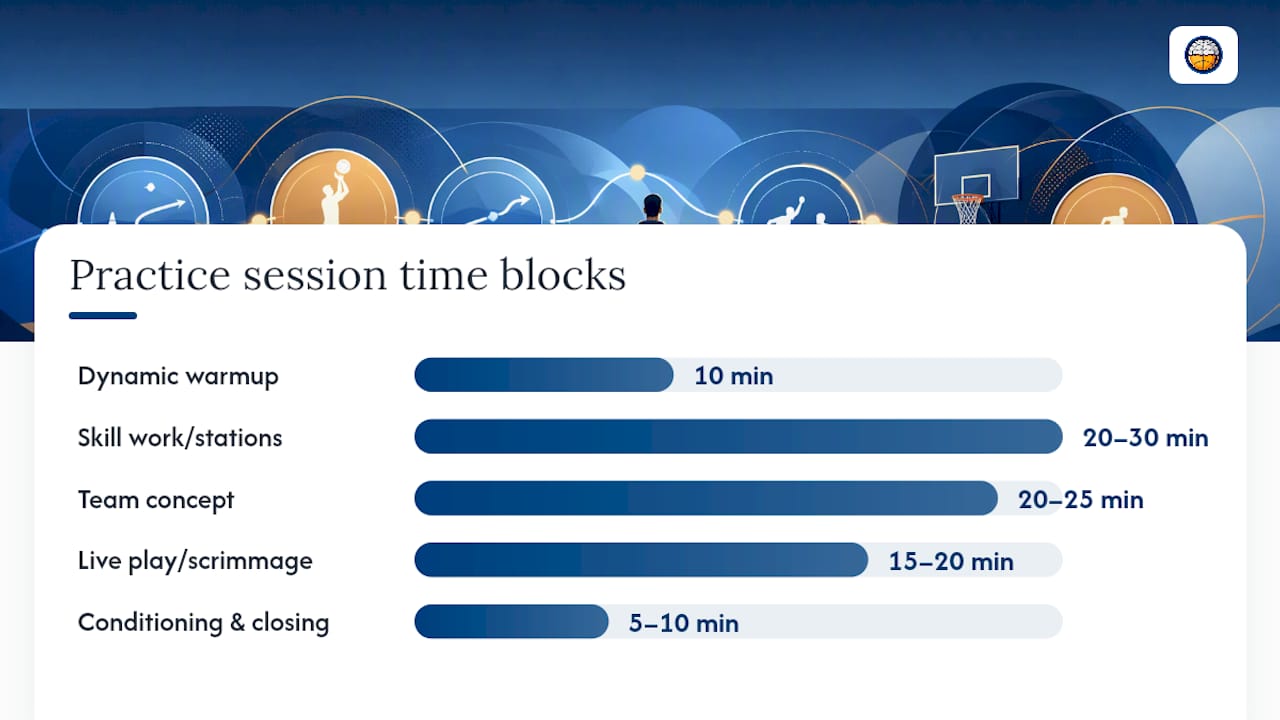
- Build the session time blocks. Dynamic warmup: 10 min. Skill work/stations: 20–30 min. Team concept: 20–25 min. Live play/scrimmage: 15–20 min. Conditioning and closing: 5–10 min.
- Select 4–6 drills. Pull from different skill categories. Use the drill library’s skill and difficulty tags to rotate core drills weekly and avoid repetitive sessions.
- Apply a progression across the week. Day 1: introduce the skill in isolation. Day 2: compound it with a second action. Day 3: apply it in a small-sided game. Day 4: test it in a full scrimmage.
- Load your template. Pick a timed template, assign drills to stations, add coaching cues, link video demos, then export a one-page PDF. The Basketball Practice Plan Template from Hoop Mentality is editable and clipboard-ready out of the box.
- Plan for contingencies. If gym time gets cut, identify which station drops first and redistribute its minutes in the template before practice starts.
Pro Tip: Keep the one-pager open on your phone and the full plan PDF shared with assistants the night before. Sync both so any last-minute edit shows up on every device.
How do skills checklists and progressions help you measure player development?
Drill execution only tells you what happened in one session. A skills checklist tracks whether players are actually developing across weeks. Hoop Mentality’s skills development workflow explains how to tag drills by skill and difficulty and connect session plans to athlete evaluations.
Build six skill domains: ball handling, shooting, passing, footwork, defense, and rebounding. For each, define four progression steps:
| Skill Domain | Starter | Developing | Proficient | Advanced |
|---|---|---|---|---|
| Ball handling | Stationary dribble, both hands | Moving dribble, dominant hand | Change-of-direction moves under pressure | Reads defense, creates off dribble |
| Shooting | Correct form, stationary | Catch-and-shoot, mid-range | Off-screen, game-speed release | Pull-up, contested, late-clock |
| Defense | Stance and slide fundamentals | Stays in front on drives | Contests shots, no reach fouls | Reads ball screens, communicates switches |
Use observable behaviors as checklist rows: form consistency, left/right dribble control, defensive stance and slide. Add assessment date columns so you can see movement across the season.
Schedule assessments in three layers: short weekly checkpoints during drill execution, a monthly formal evaluation, and in-practice spot checks tied to specific drill outcomes. Export a PDF checklist per player and attach progress notes to the weekly practice template for staff reviews.
How do you share plans with staff and communicate with players and parents?
Good plans fail when assistants don’t see them until warmup. Hoop Mentality’s ready-to-run practice examples include station setups and cue language coaches can distribute directly.
- Before practice: export the one-page PDF and the full plan; confirm each assistant has view or edit access; assign a station leader to each drill block
- Station rotation protocol: each assistant runs the same drill the same way every session; post the one-pager at each station so players self-correct
- Parent and player communication: share the weekly practice focus and two or three at-home drills via exported PDF or team calendar; keep it to one page
- Game-prep workflow: use a pre-game template for shootaround and situational reps; attach a postgame review note to the weekly plan so the next session addresses what broke down
For opponent prep, the Editable Scouting Report Template integrates directly with a weekly practice structure. Fill it in after film, attach it to the game-week plan, and share it with assistants in one step.
Should you buy a ready-made coach pack or build your own library?
Buy a ready-made pack when:
- The season starts in less than two weeks and you need zero-setup plans
- You want proven one-pagers and sideline templates without building from scratch
- You need immediate playbook pages and drill progressions in a single download
Build a DIY in-app library when:
- Your system uses plays or concepts not covered in standard packs
- You need granular progression control across a multi-coach staff
- You’re planning a full season and want every session linked to an athlete evaluation calendar
Hybrid approach: buy a starter pack, use it for the first two weeks, then import and customize its templates inside your chosen platform. The Basketball Starter Pack For Coaches is built for exactly this: clipboard-ready one-pagers and full practice plans that require zero setup for week one.
What coaches actually need from these resources
Most coaches don’t need more drills. They need drills organized into a plan they can hand to an assistant at 3:45 PM and trust it will run correctly. The gap between a good drill library and a useful coaching tool is the one-pager. Without it, even a 500-drill database is just a list.
The Jr. NBA format gets this right: a downloadable one-page plan paired with a full PDF and video links. Hoop Mentality’s templates follow the same logic. Editable, printable, and structured around real practice time blocks. The skills checklist closes the loop by connecting what happened in the drill to where the player sits on a four-step progression.
Get clipboard-ready packs and editable templates from Hoop Mentality
Hoop Mentality gives coaches practice-ready resources with no setup time. Every product ships as an editable PDF you can print, clip, and share with assistants before the first whistle.
Three products cover most coaching needs:
- Basketball Starter Pack For Coaches — one-pagers, full practice plans, and playbook pages; best for coaches who need a complete first-week solution
- Basketball Template Bundle For Coaches — editable templates for practice planning, playbooks, and staff-sharing across a full season
- Editable Scouting Report Template — fills in after film, attaches to your game-week plan, and shares in one step
Pick the pack that fits your timeline and download it today at Hoop Mentality.
Sources
- Starter Practice Plans - NBA.com: Jr. NBA
FAQ
What should a coach-focused basketball drills app include?
A coach-focused platform needs a drill library with skill and difficulty tags, timed practice-plan templates (60–90 minutes), a printable one-page PDF, and PDF export with offline access. Staff-sharing with view/edit permissions is also a core requirement.
How long should a youth basketball practice be?
Practice length depends on age group, but a standard structure covers warmup (10 min), skill work (20–30 min), team concept (20–25 min), live play (15–20 min), and conditioning (5–10 min), totaling 60–90 minutes.
What is the difference between a one-pager and a full practice plan?
A one-pager is a clipboard-ready PDF with timed blocks and drill names for sideline use. A full practice plan adds coaching cues, video links, station assignments, and progression notes for staff review before and after practice.
When should a coach buy a ready-made pack instead of building a custom library?
Buy a ready-made pack when the season starts soon and you need zero-setup plans. The Basketball Starter Pack For Coaches from Hoop Mentality includes one-pagers and full practice plans ready to use in the first week.
How do skills checklists connect to practice planning?
Skills checklists track player movement across four progression steps per skill domain. Attach checklist results to weekly practice templates so each session addresses the gaps identified in the previous assessment.