

Use a drag ball screen to attack a defense before it’s set. A trailer sets an on-ball screen just inside the three-point line during the secondary break, forcing the on-ball defender over the screen and creating a temporary 5v4 advantage before rim protection returns. The result: pull-up threes, drives to the basket, roll threats, and kick-outs, all before the defense can organize.
Key reasons coaches use drag screens:
- Pace advantage. The screen arrives while defenders are still sprinting back, not set.
- Rim protection gap. Bigs trailing on defense haven’t recovered, leaving the paint open.
- Simple to teach. Works in 5-out and 4-out/1-in spacing with any roster.
- Multiple scoring options. One action generates pull-ups, rolls, slips, and kick-outs.
- Applicable at every level. Youth through NBA teams run drag screens for the same reasons.
Table of Contents
- Why does a drag screen create an offensive advantage?
- When should you run a drag screen in a game?
- How do you execute the drag screen with proper spacing?
- What are the primary reads off a drag screen?
- How do defenses guard drag screens, and how do you counter each look?
- Drills and progressions to teach the drag screen
- A sample drag play and a 10-minute practice plan
- In-game coaching checklist for the drag screen
- Key Takeaways
- The drag screen is underused, and here’s why that matters
- Hoop Mentality has the resources to install this fast
- Useful sources
- FAQ
Why does a drag screen create an offensive advantage?
The drag screen works because transition defense is structurally vulnerable. Defenders are sprinting back, focused on stopping the ball, not on locating a trailing screener. When that trailer sets a screen just inside the arc, the on-ball defender faces an immediate choice with no help behind them.
The core mechanical steps:
- Trailer sprints the floor and arrives at the screen spot within the first 3–5 seconds of the secondary break.
- Screen is set just inside the three-point line, angled to force the defender over the top.
- Ball-handler attacks off the screen before the defense can hedge or rotate.
- Screener reads the coverage and rolls, pops, or slips based on the defender’s reaction.
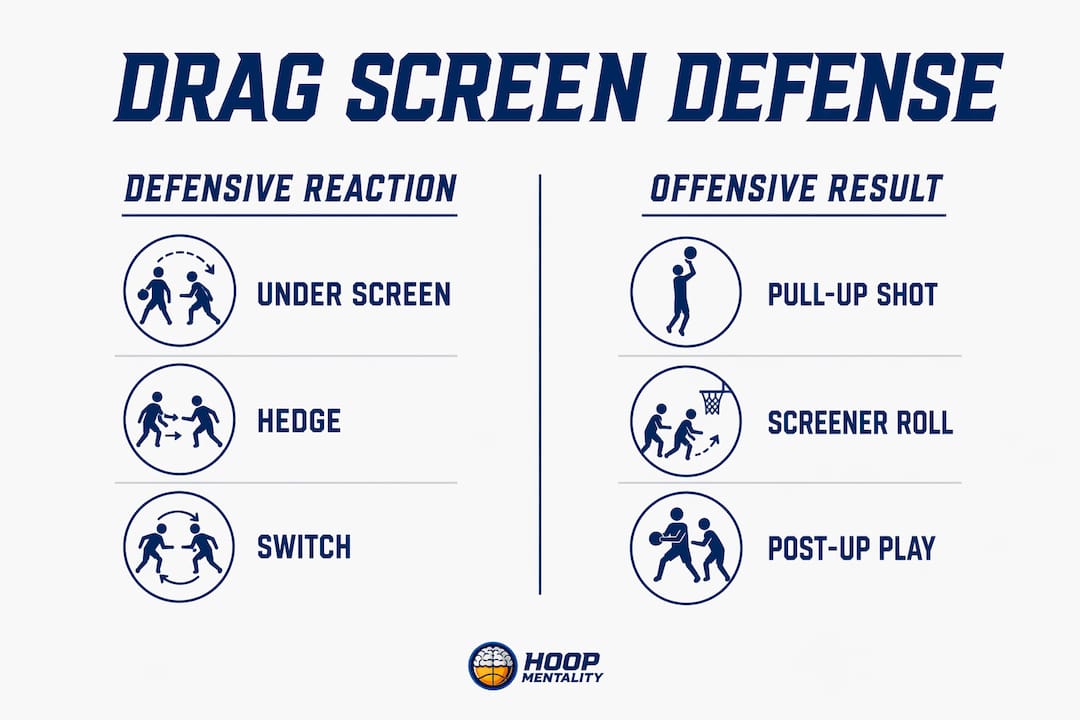
That sequence converts scrambled matchups into real scoring options. If the defender goes under the screen, the ball-handler gets a pull-up three. If the defense hedges hard, the screener rolls to an open paint. If defenders switch, a mismatch appears immediately. NBA teams use drag screens precisely because bigs trailing the play produce roll and pop advantages that half-court sets can’t replicate.
Pro Tip: A light brush screen in transition is often more effective than heavy contact. It’s less predictable, gives defenders less time to set coverage, and keeps the action moving at pace.
| Defensive Reaction | Offensive Result |
|---|---|
| Defender goes under screen | Ball-handler pull-up three |
| Hard hedge | Screener rolls to open paint |
| Switch | Mismatch created immediately |
| Drop coverage | Ball-handler attacks middle |
When should you run a drag screen in a game?
The drag screen fits specific game windows. Run it at the wrong moment and it becomes a half-court ball screen with no advantage.
Best moments to run it:
- Secondary break, after a defensive rebound or steal when a trailer is available.
- Late-clock early offense when the defense hasn’t fully set.
- After a made basket by the opponent when your team pushes pace.
Decision timeline (first 3–5 seconds of transition):
- Ball-handler crosses half-court with speed.
- Trailer is within two steps of the three-point line.
- Weak-side spacing is set (corner or wing occupied).
- Defender is backpedaling, not set in stance.
If all four conditions are present, the drag is on. If the trailer is late, pace over perfection still applies, but the window narrows fast.
Sideline cues: “Trailer!” signals the screener to sprint. “Drag!” tells the ball-handler to use the screen. “Early!” reminds both players the advantage only exists before the defense sets.
Pro Tip: Teach players to read the trailer’s position at half-court. If the trailer is there, the drag is available. If not, push to the next action without hesitation.
How do you execute the drag screen with proper spacing?
Alignment matters. The drag screen works best from 4-out/1-in and 5-out formations because they spread the floor and remove help defenders from the paint.
Step-by-step execution:
- Ball-handler pushes pace up the floor, attacking the middle lane.
- Screener (typically the 5) sprints the floor and sets up just inside the arc, angled toward the sideline.
- Screen angle forces the on-ball defender over the top, not under.
- Ball-handler reads the coverage and attacks immediately off the screen.
- Strong-side corner player stays wide to occupy the corner defender.
- Weak-side wing lifts or holds spacing to prevent defensive rotation.
Personnel and screener decisions:
| Screener Type | Best Action | Why |
|---|---|---|
| Athletic big (roll threat) | Hard roll to rim | Exploits switch or hedge |
| Stretch big (shooting threat) | Pop to perimeter | Forces defense to close out |
| Guard trailer | Slip or flare | Catches defense off-guard |
Coachable cues by position:
| Position | Cue | Focus |
|---|---|---|
| Ball-handler | “Attack the hip” | Use the screen, don’t drift |
| Screener | “Arrive early, angle out” | Set before defender recovers |
| Corner | “Stay wide” | Hold spacing, don’t crash |
| Weak-side wing | “Lift on contact” | Create passing lane |
A common teaching pitfall: letting the screener set up too far from the arc. Too deep and the screen becomes a half-court action. Too wide and the ball-handler has no angle to attack.
What are the primary reads off a drag screen?
Ball-handler reads, in priority order:
- Pull-up three if the defender goes under the screen.
- Attack the middle if space opens after the screen.
- Pass to the rolling screener if the defense hedges or switches.
- Kick to the lifting wing if help rotates to the screener.
- Swing weak-side for a corner three if the defense collapses.
Screener reads follow the ball-handler’s action. If the ball-handler attacks, the screener rolls hard to the rim. If the defense switches, the screener pops to the perimeter for a mismatch shot. A drag slip, where the screener immediately slips to the rim before contact, produces uncontested layups when defenders overcommit to the ball-handler.
Pro Tip: Teach the slip as a built-in counter, not an audible. If the screener reads the defender cheating toward the ball-handler before the screen is set, the slip is automatic.
Advanced teams add drag-pistol and double-drag variants. The Phoenix Suns drag series uses these wrinkles to layer in flare screens and dribble handoffs, keeping defenses off-balance when the initial action is covered.
How do defenses guard drag screens, and how do you counter each look?
Understanding ball screen defense helps coaches prepare counters before the game.
- Hard hedge. Defender jumps out to cut off the ball-handler. Counter: screener rolls immediately to the open paint.
- Soft hedge. Defender shows and recovers. Counter: ball-handler attacks the gap before recovery is complete.
- Switch. Defenders trade assignments. Counter: screener posts up or pops for a mismatch.
- Go under. Defender ducks under the screen. Counter: ball-handler pulls up for a three immediately.
- Drop coverage. Big defender sags to protect the rim. Counter: ball-handler attacks the mid-range or pulls up at the arc.
Pro Tip: Read the big defender’s feet first. If they’re set and facing the ball-handler, it’s a hedge. If they’re retreating, it’s a drop. That single read tells the ball-handler whether to shoot or drive before the screen is even set.
Coaching script for adjustments: “They’re dropping, pull up!” or “Switch, post him up!” Keep it one phrase. Players can’t process more than that in transition.
Drills and progressions to teach the drag screen
Drill 1: Walk-Through Drag (no defense)
- Ball-handler and screener walk through arrival timing and screen angle.
- Focus: screener arrives before the ball-handler crosses the arc.
- Reps: 5 each side. Common mistake: screener setting up too late or too deep.
Drill 2: 3v2 Early Offense
- Three offensive players (ball-handler, screener, corner) vs. two defenders.
- Defense starts at half-court, offense pushes pace.
- Focus: ball-handler reads coverage and makes the first correct decision.
- Common mistake: ball-handler slowing down at the screen instead of attacking.
Drill 3: Full-Court Secondary Break with Drag Trigger
- Five-on-five, live transition after a made basket.
- Trailer must set the drag within 5 seconds of the ball crossing half-court.
- Focus: timing, spacing, and screener’s roll or pop decision.
- Common mistake: weak-side players crashing instead of holding spacing.
Pro Tip: For youth teams, use ball screen fundamentals before adding transition speed. Teach the screen angle and roll in a stationary setting first.
Pro Tip: Film one live rep per practice and review it immediately. Players correct timing errors faster when they see the gap between where the screener arrived and where they needed to be.
A sample drag play and a 10-minute practice plan
Sample Play: “Drag 5-Out”
- Trigger: ball-handler pushes pace after a defensive rebound.
- Setup: four players spread to corners and wings, 5 trails as screener.
- Execution: 5 sets drag just inside the arc, ball-handler attacks off the screen.
- Options: pull-up three, drive and kick, or pass to rolling 5.
10-Minute Practice Plan:
- Minutes 1–2: Walk-through drag, no defense. Focus on screener arrival and angle.
- Minutes 3–6: 3v2 early offense drill. Four rotations each side.
- Minutes 7–9: Full-court 5v5 secondary break with drag trigger. Live reps.
- Minute 10: Feedback. Coach identifies one timing fix and one spacing fix.
Teaching checkpoints during the drill:
- Did the screener arrive before the ball-handler crossed the arc?
- Was the screen set just inside the three-point line?
- Did the ball-handler attack immediately, or hesitate?
- Did weak-side players hold spacing?
Pro Tip: Keep the 10-minute block self-contained. Coaches using the Basketball Template Bundle For Coaches can drop this plan directly into an editable practice sheet and adjust reps without rebuilding from scratch.
In-game coaching checklist for the drag screen
Before the possession:
- Trailer is identified and sprinting the floor.
- Weak-side spacing is set.
- Ball-handler has pace, not walking the ball up.
During execution:
- Screen set just inside the arc? ✓
- Ball-handler attacking immediately? ✓
- Screener rolling or popping based on coverage? ✓
- Corner player staying wide? ✓
Sideline cues:
- “Trailer!” — sprint the floor now.
- “Drag!” — use the screen.
- “Roll!” — screener to the rim.
- “Pop!” — screener to the perimeter.
- “Shot!” — pull-up opportunity open.
- “Kick!” — pass to the open wing.
- “Early!” — arrive before the defense sets.
- “Slip!” — screener cuts before contact.
Pro Tip: During a timeout, fix one thing only. If the screener is arriving late, address that. Don’t stack corrections. One fix executed well beats three fixes ignored.
Key Takeaways
The drag ball screen wins early-offense possessions by forcing defensive decisions before rim protection returns, creating a 5v4 window that half-court sets cannot replicate.
| Point | Details |
|---|---|
| Transition timing is everything | The screener must arrive within 3–5 seconds of the secondary break to create a real advantage. |
| Screen placement drives options | Just inside the three-point line forces the defender over the top and opens pull-ups, rolls, and kicks. |
| Pace beats perfection | Arriving early in transition matters more than a flawless screen on first implementations. |
| Reads follow coverage | Ball-handler and screener each have a priority read based on how the defense responds. |
| Hoop Mentality resources | The Basketball Template Bundle and Starter Pack include diagrammed drills and practice plans to install the drag fast. |
The drag screen is underused, and here’s why that matters
Most coaches treat the drag screen as a bonus action, something to run when the trailer happens to be there. That framing undersells it. The drag is a designed transition weapon, and the teams that use it consistently treat it as a first option off every defensive rebound, not a fallback.
The deeper issue is that coaches often spend practice time on half-court sets and leave transition offense to improvisation. But transition is where the most efficient shots in basketball come from. A drag screen run at the right moment, with the screener arriving early and the ball-handler attacking with pace, produces layups and open threes against a defense that simply hasn’t had time to organize. That’s not luck. That’s structure applied to chaos.
The slip counter is the most undercoached piece of this action. When defenders start cheating toward the ball-handler to stop the pull-up, the screener slipping to the rim before contact becomes automatic. Coaches who teach the slip as a read, not an audible, get far more uncontested layups than those who treat it as a surprise move.
Install the drag with a clear teaching progression. Walk-through first, then controlled 3v2, then live. Give players two or three reads, not six. The action is simple enough to run at every level, and that simplicity is the point.
Hoop Mentality has the resources to install this fast
Coaches who want ready-to-use materials for the drag screen don’t need to build from scratch. Hoop Mentality offers three resources that cover the full installation process.
The Basketball Starter Pack For Coaches includes play diagrams, progressive drills, and practice templates built for coaches who need to install actions like the drag screen quickly. The Basketball Template Bundle For Coaches gives you editable practice sheets you can drop a 10-minute drag session into without rebuilding the plan each time. For coaches focused on the pull-up and kick-out reads the drag creates, the Basketball Shooting Bundle For Coaches pairs directly with drag read drills.
Use the Editable Scouting Report Template to track how opponents defend drag screens and adjust your counters before each game. Browse all resources at hoopmentality.com and add what fits your system.
Useful sources
- Ball Screen Offense — Keys to an Effective Drag Screen (Hooper University): Detailed breakdown of drag screen mechanics, placement, and transition timing principles.
- Drag Screens (FastBreak Coaches Community): Covers follow-up actions including slip, flare, and dribble handoff variations.
- Drag — The Basketball Dictionary (Medium, Dylan Murphy): Explains contact levels, screener hustle, and why light-brush screens work in transition.
- Video Breakdown: Drag Screens in Secondary Transition (NBC Sports): Film study reference showing how NBA teams use drag screens with trailing bigs.
- Phoenix Suns Drag Screens — Fast Breaks (HoopsPlaybook): Advanced drag variants including double-drag and drag-pistol packages.
- Drag Series for Secondary Break (HoopDirt): Play diagrams for drag slip, drag flare, and pistol action in 5-out and 4-out/1-in formations.
| Source | Best For |
|---|---|
| Hooper University | Mechanics, timing, and placement fundamentals |
| FastBreak Coaches Community | Follow-up actions and roster-flexible variations |
| The Basketball Dictionary (Medium) | Contact technique and screener hustle cues |
| NBC Sports Video Breakdown | Film study and NBA-level application |
| HoopsPlaybook | Advanced drag variants and play packages |
FAQ
What is a drag screen in basketball?
A drag screen is an on-ball screen set by a trailing big player during the secondary break, just inside the three-point line, designed to attack the defense before it’s fully set.
Why use a drag ball screen instead of a half-court set?
Drag screens exploit transition chaos, creating a 5v4 advantage before rim protection returns. Half-court sets give the defense time to organize; the drag does not.
When does the drag screen stop working?
The advantage disappears if the screener arrives late. The timing window is 3–5 seconds into the secondary break; after that, it becomes a standard half-court ball screen with no transition edge.
What alignments work best for running drag screens?
5-out and 4-out/1-in spacing work best because they spread the floor and remove help defenders from the paint, giving the ball-handler and screener more room to operate.
How do Hoop Mentality resources help coaches teach the drag screen?
The Basketball Starter Pack and Basketball Template Bundle include diagrammed drills and editable practice plans coaches can use to install the drag screen in a single 10-minute practice segment.